Last updated: 24 November 2026 · By Yashna Bhuwania (ARN-325085) · Screenshots taken: November 2026
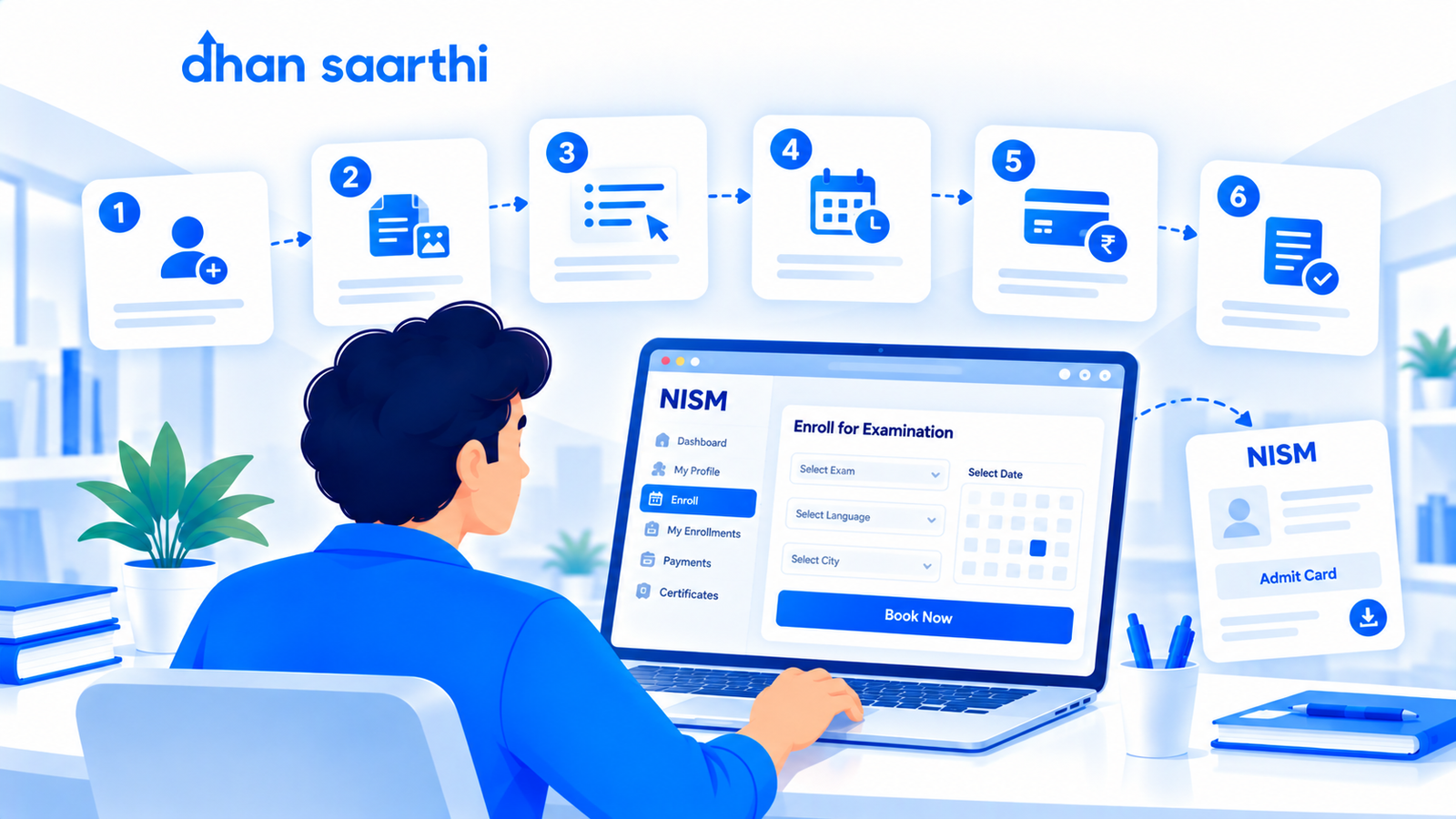
Quick answer: To register for NISM 5A (Series V-A), go to cert.nism.ac.in, click Create new account and upload your PAN, photo and address proof (JPEG, under 1 MB each). NISM says it approves new accounts within 48 hours; allow up to 3 working days. Then log in, click Enroll > Examination, pick Series V-A, a test centre, date and slot, and pay ₹1,500 plus gateway charges.
Go to the NISM portal| NISM 5A registration at a glance | Detail |
|---|---|
| Portal | cert.nism.ac.in (the old certifications.nism.ac.in portal now points here) |
| Exam fee (5A) | ₹1,500 plus payment gateway charges |
| Account approval | Within 48 hours, per NISM. Plan for up to 3 working days. |
| Booking cut-off | Enrolment closes 48 hours before the exam date |
| Enrolment validity | 180 days from the day you enrol |
| Reschedule | Once, at least 4 days before the exam |
| Certificate | Soft copy only, downloaded from the portal after you pass |
Source: NISM registration guide, candidate instructions and refund and rescheduling policy, checked 24 November 2026.
Which NISM portal should you use?
Use cert.nism.ac.in. Google still shows two NISM logins, and guides split between them. The old portal, certifications.nism.ac.in/nismaol, still opens, but it now carries a notice that the candidate portal "has been updated" with a link to cert.nism.ac.in. NISM's registration guide also names cert.nism.ac.in.
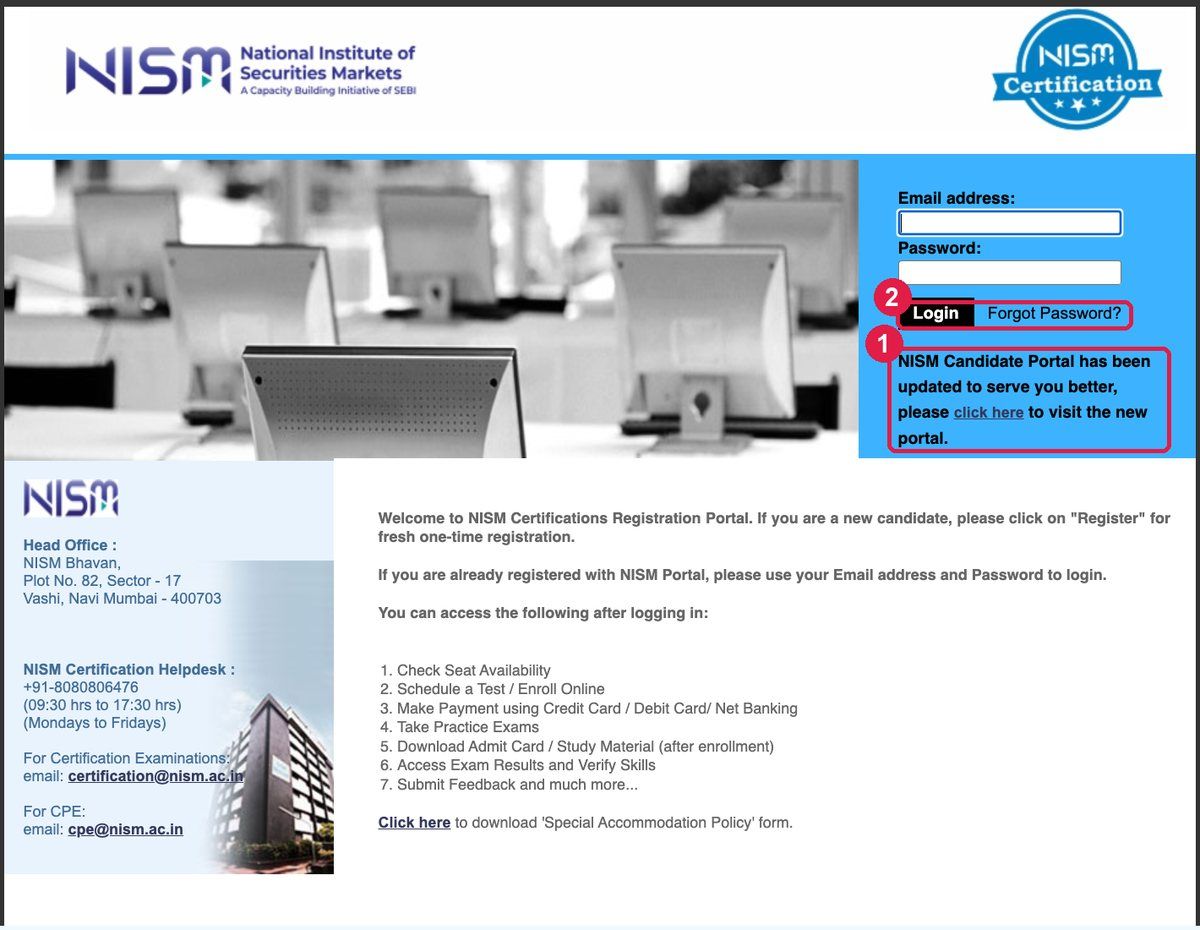
| cert.nism.ac.in | certifications.nism.ac.in/nismaol | |
|---|---|---|
| Status | Current portal (2026 design) | Old portal, shows a "visit the new portal" notice |
| New account | Yes: Create new account | Do not register here |
| Already registered years ago? | Try the same email on cert.nism.ac.in. If it says the email already exists, do not make a second account; use Forgot password. | |
What do you need before you register?
The Create Account page lists the same documents NISM's guide does. Tick these off before you start:
Pre-upload checklist
- ☐ PAN card scan: JPEG/JPG, under 1 MB, your own individual PAN. NISM issues the certificate only after it verifies your PAN.
- ☐ Photograph: a recent colour passport-size photo, JPEG/JPG, under 1 MB. It is printed on your admit card and certificate, so use a clear face on a plain light background.
- ☐ Address proof: JPEG/JPG, under 1 MB. If you pick Aadhaar, the form asks for a masked copy (only the last 4 digits visible).
- ☐ Name exactly as on PAN. NISM prints the certificate in the name you register, and a mismatch with your ID can stop you at the test centre.
- ☐ A personal email you will keep. Admit cards and certificates go only there.
- ☐ Your mobile for OTP, plus education, professional qualification and employment details.
- ☐ Simple file names such as pan.jpg and photo.jpg.
Eligibility: Series V-A is open to anyone with a PAN; there is no degree requirement. For exam day you also need an original photo ID: PAN, Aadhaar, driving licence or passport (a DigiLocker copy with your photo also works).
How do you register for NISM 5A, step by step?
Step 1: Open cert.nism.ac.in
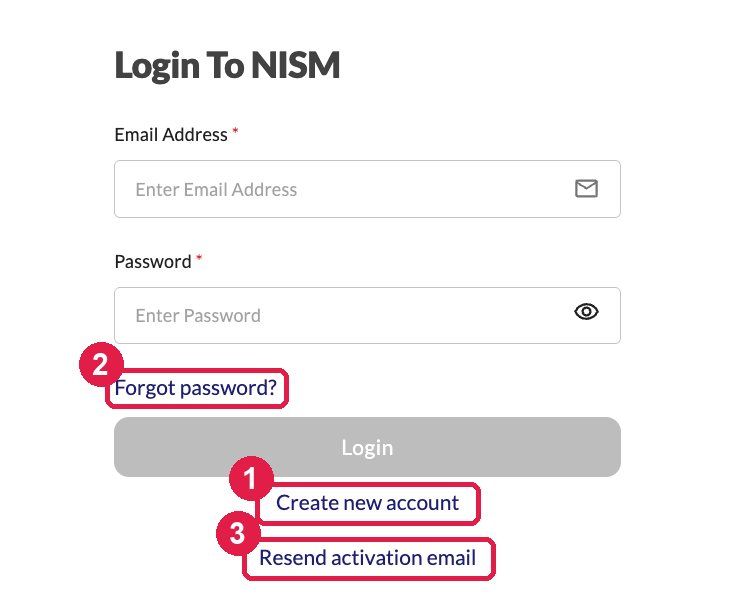
Go to cert.nism.ac.in and click Create new account. If you registered before, use Forgot password instead.
Step 2: Create your account (once)
- Enter your email twice and a password twice, then click NEXT.
- Fill in personal details and upload your PAN scan and photo.
- Upload address proof, enter your address and mobile number, and verify the mobile by OTP.
- Add education, professional qualifications and employment details, review everything, enter the captcha, give consent and click SUBMIT.
- Enter the activation OTP sent to your email (check spam).
- Wait for "Your profile is approved". You also get a NISM registration number; quote it in every email to NISM.
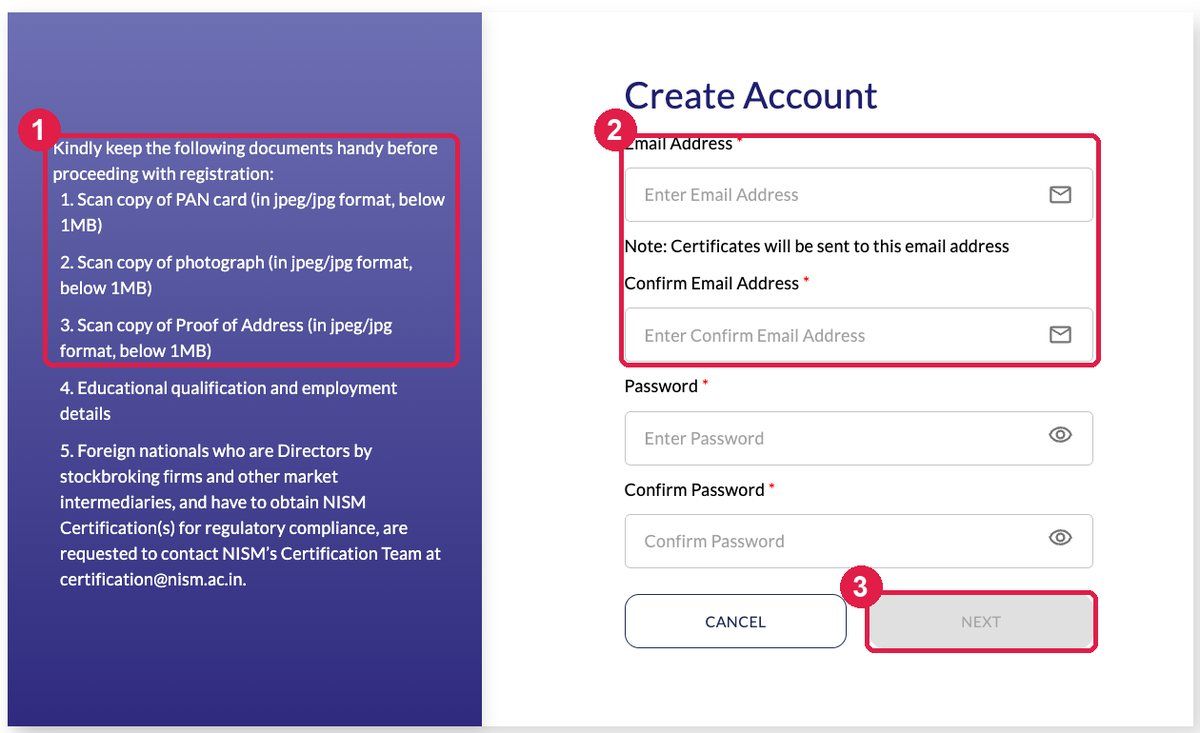
Step 3: Choose the exam, test centre and slot
- Log in and click Enroll, then Examination.
- Select NISM Series V-A. It has separate English and Hindi entries; the language you pick here is the language of your paper.
- Choose the city and test centre, set a date range to see free seats, and pick a slot.
Which exam should you pick: 5A English, 5A Hindi or 5D?
- Series V-A (English or Hindi): ₹1,500, 100 questions in 2 hours, 50% to pass, no negative marking. Enough for an ARN.
- Series V-D: ₹3,000, 150 questions in 3 hours, 60% to pass, 10% negative marking. Pick it only if you also want to sell SIFs. See our 5D guide.
- Series V-B: restricted to specific groups (such as postal and retired government or bank staff). Do not pick it by accident; fees are not refunded and you cannot switch exams.
Step 4: Pay the fee
Click Pay Now and pay by credit or debit card, net banking or UPI. You get confirmation by email and SMS, and the receipt stays under My Transactions.
Step 5: Download your admit card
The admit card appears after enrolment and stays under My Enrollments. It is soft copy only: print it and carry it with an original photo ID. Reach the centre 30 minutes early; the exam system does not let you log in more than 30 minutes after the start time.
Step 6: Prepare
Download the free workbook from NISM's study material page and try the practice exams in your dashboard. Then take our free NISM 5A mock test.
How long does approval take, and when should you register?
NISM's guide says it verifies new accounts within 48 hours. Other guides quote 2 to 3 working days, so plan for 3 working days. Then add the 48-hour booking cut-off. Work back from the date you want:
| Exam date you want | Booking closes | Approval needed by | Create account by |
|---|---|---|---|
| Exam date (D) | D minus 2 days | D minus 3 days | 3 working days before that, plus weekends and holidays |
| Sat 16 Jan 2027 | Thu 14 Jan | Wed 13 Jan | Fri 8 Jan |
| Mon 1 Feb 2027 | Sat 30 Jan | Fri 29 Jan | Fri 22 Jan (26 Jan is a holiday) |
In a big city, register at least 7 days before your target date. In a smaller city, where a centre may run only 4 to 10 exam days a month, register 2 to 3 weeks ahead so you have a second date if the first is full.
How do you pick a test centre and slot?
NISM publishes a calendar each month on its exam centres page. The December 2026 calendar lists 232 centres. Here is how the big cities look:
| City | Centre with most dates | Exam days in Dec 2026 | Weekends? |
|---|---|---|---|
| Mumbai | Fort (FinX); NISM BKC | 29; 25 | Yes |
| Delhi | Connaught Place (FinX), Jhandewalan (FinX) | 29 each | Yes |
| Bengaluru | Indiranagar (FinX) | 29 | Yes |
| Hyderabad | Kukatpally (FinX) | 29 | Yes |
| Kolkata | Kankaria Estate (FinX) | 29 | Yes |
| Pune | Swargate | 18 | No (NISM's Hiraben Nanavati centre: 2 weekend days) |
| Ahmedabad | Navrangpura | 18 | No |
| Chennai | Chennai | 14 | No |
The pattern: FinX and NISM-run centres hold exams on weekends with up to four slots a day. Most other centres run on weekdays only, with two afternoon slots (1:30 to 3:30 pm and 3:30 to 5:30 pm). If you need a Saturday or Sunday, look for a FinX or NISM centre and book early. Calendar checked 24 November 2026; download the current month before you book.
How much are the NISM exam fees?
Fees for the exams a mutual fund distributor is most likely to take, as of 8 October 2026. Payment gateway charges are extra.
| Exam | Who it's for | Fee | Questions / time | Pass mark | Negative marking |
|---|---|---|---|---|---|
| Series 5A: Mutual Fund Distributors | Anyone getting an ARN | ₹1,500 | 100 / 2 hours | 50% | None |
| Series 5B: Mutual Fund Foundation | Restricted to postal, retired govt/bank/teacher staff | ₹1,200 | 50 / 2 hours | 50% | None |
| Series 5D: MF and SIF Distributors | Distributors who also want to sell SIFs | ₹3,000 | 150 / 3 hours | 60% | 10% |
| Series 21A: PMS Distributors | Distributors adding PMS | ₹1,500 | 2 hours | 60% | 10% |
| Series 8: Equity Derivatives | Those dealing in equity derivatives | ₹1,500 | 2 hours | 60% | 25% |
All five certificates are valid for 3 years. Source: NISM certifications list.
Can you take the NISM exam online from home?
No. NISM stopped remote-proctored exams on 1 January 2023 (notice). Registration and payment are online, but the exam is taken only at a NISM test centre. Only the eCPE renewal programme can be done from home.
Can you reschedule or cancel a NISM exam?
- Reschedule: yes, once per enrolment, from your own login, at least 4 days before the exam (not counting the exam day and today). No fee is listed.
- Cancel: no. Fees are not refunded once you enrol, and you cannot switch to a different exam.
- Miss the exam or let 180 days pass: the fee is forfeited, with no refund or reschedule.
- Refunds happen only if your account was debited but enrolment failed, you were charged twice, or NISM could not hold the exam. Gateway charges are not refunded.
Source: NISM refund and rescheduling policy and candidate instructions.
How do you log in or reset a forgotten password?
Log in at cert.nism.ac.in with your registered email and password. To reset the password, click Forgot password? and enter your NISM registration number or registered email, plus your date of birth.
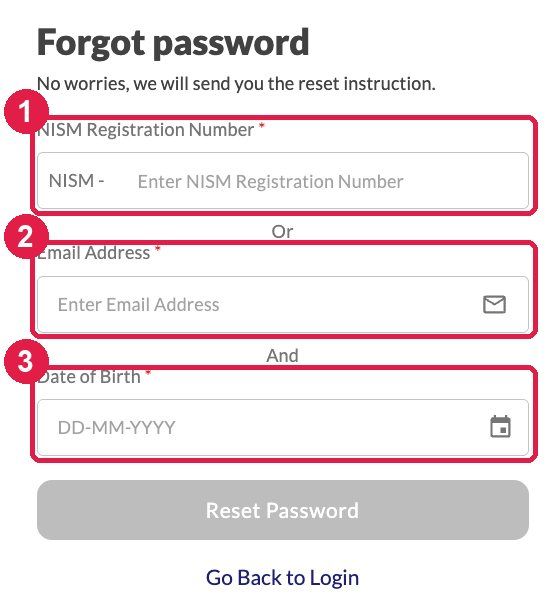
- Forgot which email you used? Call the NISM helpdesk with your registration number or PAN.
- Activation OTP never came? Check spam, then use Resend activation email on the login page.
What are the common NISM registration problems?
| Problem | Fix |
|---|---|
| "This email-id already exists" | You registered before. Use Forgot password on the login page instead of a new account. |
| Registered on the old portal years ago | Log in at cert.nism.ac.in with the same email. If the password fails, reset it with your NISM registration number and date of birth. |
| Account not approved after 3 working days | Check your email (and spam) for a NISM message saying a document was improper. Re-upload it from Edit Profile. |
| PAN or photo rejected | You can replace them in Edit Profile only while they show "NOT VERIFIED". Upload a clear JPEG under 1 MB. |
| Payment deducted, enrolment not confirmed | Check My Transactions. If it shows unsuccessful, NISM refunds automatically within 6–7 working days. If not, email certification@nism.ac.in with your transaction number and receipt. |
| Admit card not received | Look under My Enrollments; admit cards are soft copy only. If missing, contact the helpdesk. |
| Name on ID doesn't match registration | Fix it before exam day. NISM can refuse entry for a mismatch and mark you absent, with no refund. |
NISM certification helpdesk: 8080806476 (9:30 am to 5:30 pm, Monday to Friday) or certification@nism.ac.in.
After the exam: where are your registration number and certificate?
- Registration number: issued when your account is activated and shown on your profile. You need it for password resets and NISM emails.
- Certificate: NISM's guide says the soft copy is emailed about 72 hours after the exam; its candidate instructions allow up to 10 to 15 working days. Download it from My Enrollments. NISM does not issue printed certificates.
- Validity: My Certification shows every NISM exam you have taken and when each certificate expires (3 years for 5A).
What should you do after registering?
Start preparing the day you book. Our NISM Series 5A exam guide covers the syllabus weightage and a 30-day study plan, and the free 5A mock test shows where you stand. Once you pass, apply for your ARN; the ARN registration guide explains the steps and fees.
Sources
- NISM certification portal
- NISM: How to register and enrol (guide, June 2025)
- NISM: Candidate instructions
- NISM: Refund and rescheduling policy
- NISM: Exam centres and monthly calendar
- NISM: Certifications list (fees and pattern)
Mutual fund investments are subject to market risks, read all scheme related documents carefully. Distribution services are offered through Khazana Fintech Pvt. Ltd. (AMFI ARN – 325085). Portal steps, screenshots and fees are as of November 2026; check NISM before you register.