Last updated: 13 November 2026 · By Mahak Jain
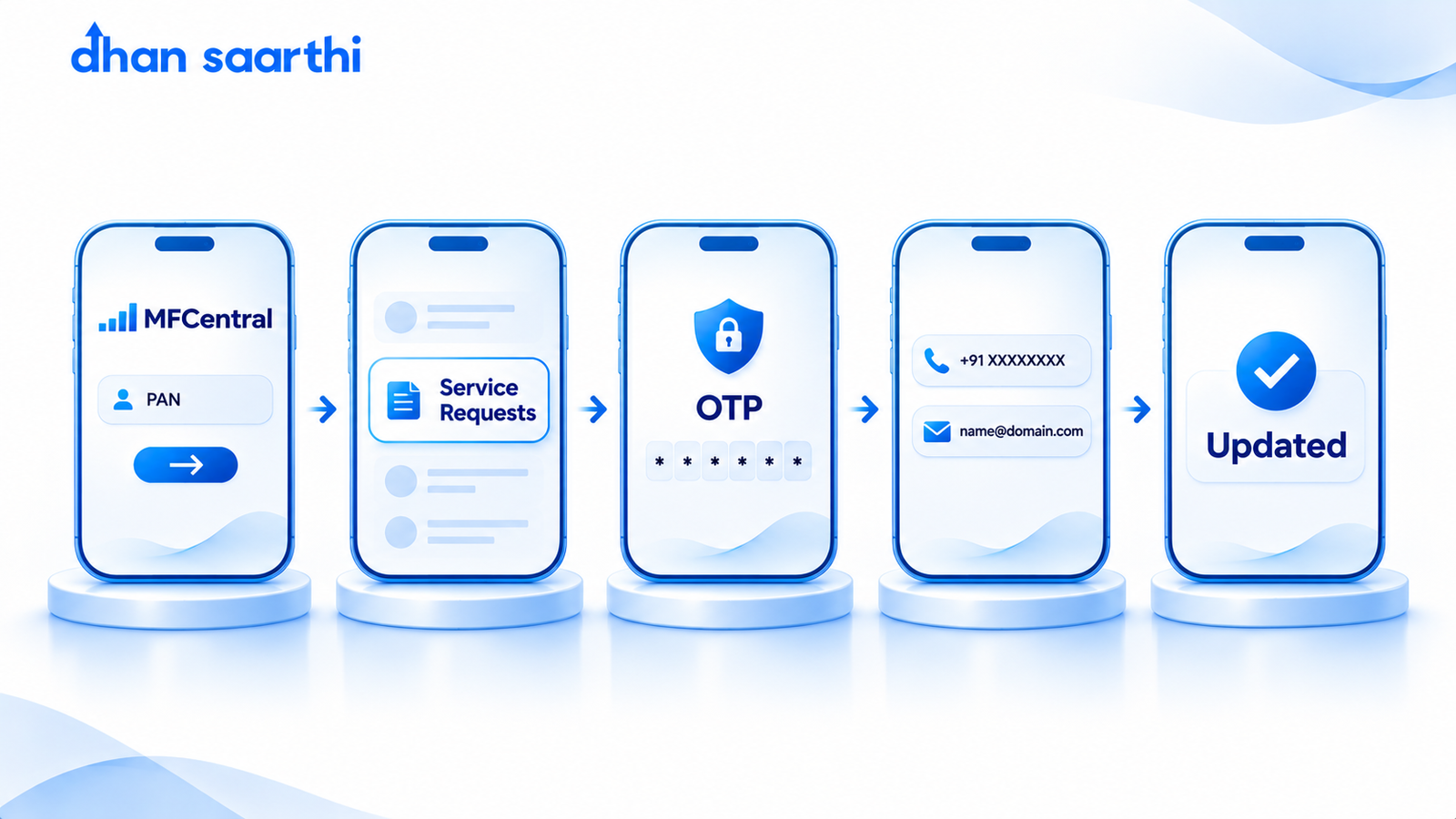
Quick answer: Your client logs in to MFCentral with their PAN, goes to Service Requests, and picks Change/Update Email Address or Change Registered Mobile Number. They enter the new email or mobile, choose the relationship (Self, or a family member), and confirm with OTPs on the old and new contact. One request updates every eligible non-demat folio across fund houses serviced by CAMS and KFintech. Lost the old SIM? Pick the signed, scan-based option instead. It is free. You guide the client, and the client types every OTP.
| Key fact | Email or mobile change on MFCentral |
|---|---|
| Where | MFCentral website or app → Service Requests |
| Who submits | The investor (first holder) logs in with PAN or PEKRN |
| Folios covered | All eligible non-demat folios under the PAN, across fund houses. You cannot pick one folio |
| Verification | OTPs on the registered and new contact; email OTP for the new email |
| Lost old mobile | Signed, scan-based request; done after signature check |
| Not covered online | Demat folios, folios opened through MF Utility (MFU), locked folios |
| Cost | Free |
| Track at | MFCentral → Track Request |
As per the MFCentral FAQ, checked 13 November 2026. Screen names can change; follow what the portal shows.
How to change email ID in MFCentral?
The client can do this in about five minutes from a phone or laptop. Keep your client on a call while they do it, so you can guide each screen.
Log in to MFCentral
Go to app.mfcentral.com, enter the PAN (or PEKRN), then the password or the OTP on the registered mobile, and answer the security question.
Open Service Requests
Choose Change/Update Email Address. The screen shows the fund houses, folios and the current email that will change.
Verify the current contact
Enter the OTP sent to the registered contact. This proves the request comes from the investor.
Enter the new email and relationship
Type the new email carefully and pick the relationship: Self, or a family member if the email belongs to one.
Verify the new email
Enter the OTP sent to the new email. This proves the address is typed right and the client can open it.
Submit and save the reference number
Note the reference number on the confirmation screen. Log in again and check the email under Profile.
How to change mobile number in MFCentral?
Same flow, one extra point: the new mobile must be active and able to receive SMS before you start. MFCentral does not accept a change without OTP on the new number.
Log in and open Service Requests
Choose Change Registered Mobile Number.
Enter the new mobile and relationship
Pick Self, or the family relationship if the number belongs to a family member.
Verify the new mobile
Enter the OTP sent to the new number.
Verify the existing contact
Enter the OTP on the old registered mobile or registered email, as the screen asks. Review the folios and fund houses shown.
Submit and note the reference number
The client does not need to sign up again. MFCentral recognises them by the new number once both OTPs are done.
OTP tips: an OTP is valid for 10 minutes, and you can ask for a new one after 30 seconds. If SMS still does not arrive, write to support@mfcentral.com.
What if the client lost access to the old mobile number?
This is the most common case MFDs face. A client changed SIMs years ago and the folio still has the old number.
- ✓ Client knows the MFCentral password: log in with PAN and password, start Change Registered Mobile Number, and answer No when asked to verify the old mobile. MFCentral then asks for a signed, scanned request.
- ✓ Signature must match: the signature on the scan must match the one in the original application. A mismatch is the top reason for rejection.
- ✓ Wait for verification: the client cannot use MFCentral for those folios until the RTA verifies the signature and updates the new number.
- ✓ No old mobile and no password: the client visits any CAMS or KFintech branch (400+ across India) with the change request, then signs up on MFCentral with the new number.
Why can't I change email or mobile for only one folio on MFCentral?
By design. MFCentral logs users in with a mobile OTP and builds the portfolio view from folios that share the same PAN and mobile. So it applies one email and one mobile to every eligible folio. This keeps CAS, OTPs and fund house messages going to one place.
If a client has different numbers in different folios, those folios show up as Unregistered Folios after login. The client can bring them onto the same number from that section with a scan-based request. Do this first, or the change will not reach those folios.
Can a mutual fund folio have a family member's email or mobile?
Yes, but only of a family member, and the client must declare the relationship. Industry rules let a folio carry the email or mobile of the investor's family, such as spouse, dependent children or dependent parents, with a family declaration (CAMS investor letter). On MFCentral, the relationship field you fill in is that declaration.
- ✕ Never put your own email or mobile in a client's folio. An MFD's or employee's contact details are not allowed in client folios, and RTAs flag and remove them.
- ✕ Don't use a friend's or an office number. If it is not the investor's own or a family member's, the RTA can reject it.
- ✕ Don't collect the client's OTPs. The client should type every OTP. It protects them, and it protects you if anything is ever disputed.
MFCentral email or mobile change not working? Common reasons and fixes
| What you see | Likely reason | Fix |
|---|---|---|
| OTP not received | Old number inactive, network delay, DND | Wait 30 seconds and resend; use the scan-based route if the old SIM is gone |
| Folio greyed out / not selectable | Folio is in demat form or was opened through MFU | Demat: update through the depository participant. MFU: use MF Utility |
| Request blocked | Client locked the folio for debit and non-financial transactions | Client unlocks on MFCentral with OTPs on email and mobile, then raises the request |
| Some folios missing | Folios have a different mobile or no PAN | Fix them under Unregistered Folios, or update PAN first |
| Cannot sign up | International mobile number | MFCentral accepts Indian mobile numbers only today; change through the AMC or RTA |
| New SIM not active | MFCentral needs an OTP on the new number | Wait until the SIM is active, then start again |
| Request rejected | Signature mismatch, data mismatch or scheme rule | Check the reason under Track Request; contact the RTA for the fund |
Based on the MFCentral FAQ, including the Voluntary Lock-in facility rules.
How to track the email or mobile change request on MFCentral?
Open Track Request after login. Each request shows the type, reference number, date and status, and you can expand it to see each fund house and folio. If the client lost the internet mid-way, check here before raising a second request. Duplicates only slow things down.
Once it shows complete, ask the client to download a fresh CAS from MFCentral. If the new email receives it, the change worked. Also update the contact in your own CRM and on your platform.
Does changing email or mobile on MFCentral update KYC?
No. MFCentral updates the contact in the folios at CAMS and KFintech. The client's KYC record at the KRA (KYC registration agency) is separate. If the old number is also in KYC, update it through a KYC modification with a registered intermediary. Otherwise future folios may pick up the old details.
| Route | What it updates | Best for |
|---|---|---|
| MFCentral | All eligible non-demat folios at CAMS and KFintech, in one request | Most clients, fully online |
| CAMS or KFintech website / branch | Folios serviced by that RTA | Lost access, signature issues, NRIs with foreign numbers |
| AMC website or branch | That fund house's folios only | Single fund house clients |
| Depository participant (DP) | Demat holdings | Units held in a demat account |
| KYC modification (KRA) | The KYC record | Keeping new investments on the new contact |
Checklist for MFDs before a client changes contact details
- Confirm the new number is active and receives SMS, and the client can open the new email.
- Check the folios for demat, MFU or locked folios that MFCentral cannot change.
- Fix Unregistered Folios first, so one request reaches every folio.
- Ask whose contact it is, and pick the right relationship. Never use your own.
- Keep the signature in mind if the old mobile is gone; it must match the original form.
- Save the reference number in your CRM against the client.
- Confirm with a fresh CAS and update KYC if the old details are also there.
Doing this during a yearly review saves trouble later. See our annual client review framework and portfolio health checkup.
Serve clients faster with Dhan Saarthi
One platform for client onboarding, transactions, portfolio tracking, proposals, fund insights and commission information, with a service desk for client requests. Khazana Fintech Pvt. Ltd., AMFI ARN-325085.
Book a Demo with Dhan SaarthiSources
- MFCentral: FAQs on email, mobile, service requests and folio lock (checked 13 November 2026)
- MFCentral: investor services
- CAMS: investor letter on family declaration for common email and mobile
Disclaimer: This article is for education only. It is not investment, tax or legal advice. MFCentral screens and rules are as published on the date stated and can change. Distribution services are offered through Khazana Fintech Pvt. Ltd. (Dhan Saarthi), AMFI-registered Mutual Fund Distributor, ARN-325085. Mutual fund investments are subject to market risks; read all scheme-related documents carefully.